Turn a WhatsApp message
into a professional invoice.
Create a professional invoice from a short form in WhatsApp or on your dashboard, or from one line on Pro. Add your UPI ID, and let reminders do the chasing.
Only need a UPI QR? Make one free
₹40,000 is in your account, so you close INV26-007.

Riffit
online
Bill Priya 40k for branding
✨ Invoice preview
Client: Priya Sharma
Items: Branding · ₹40,000
Total: ₹40,000
✅ Invoice sent. Priya can view & pay at the link.
Features
More than a pretty PDF.
Built around how Indian freelancers actually work, not how accounting software thinks they should.
Professional PDFs, ready to send.
Your business details and GST number (if you have one) on every invoice, formatted and numbered. Pro adds your logo and brand colour, with no Riffit badge.
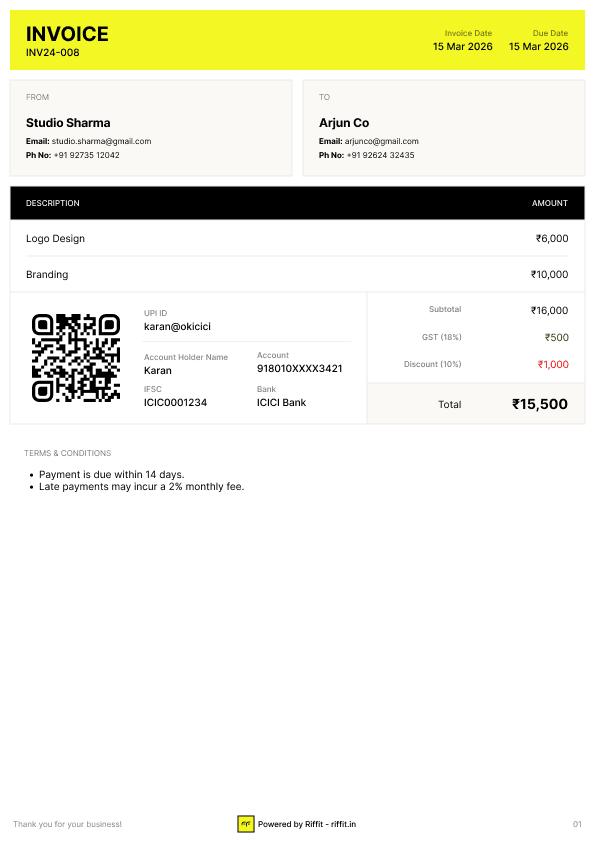
Your UPI, on the invoice.
Clients scan and pay your own account. You mark it paid when it lands.
Every client, one place.
History and what's outstanding, per client.
Know who owes you. Riffit chases.
See every invoice's status at a glance. A due-date email on Free, the full reminder schedule on Pro.
Type one line. Riffit builds the invoice.
Just say “bill Rahul ₹40,000 for brand redesign”, or send it as a voice note. Riffit reads the client, amount and work, and builds the invoice for you to check. It skips the form entirely.
|
Questions
Yes, that is the whole idea. Type new and a short form opens inside the chat, on every plan. Pick the client and a saved service, and its details and rate fill in; up to five lines per invoice. You see the full preview before anything is saved, then send the PDF by email, or on WhatsApp on Pro. No app to install.
Yes, that is what Riffit is built for. Type new in WhatsApp, fill the short form, check the preview and send. The PDF lands in your chat and your client gets a link. It takes under two minutes, and there is no app to install. The dashboard works in a phone browser too.
On Pro, you can skip the form. Type one line, "bill Rahul ₹40,000 for brand redesign", or send it as a voice note, and Riffit reads the client, the amount and the work and builds the invoice for you to check. Pro includes 10 a day, shared with quotes.
Yes. Save each service once with its rate, then pick it on any invoice or quote, on the dashboard or in the WhatsApp form. Free saves 3; Pro has no limit. Quantities can be fractions too, so 2.5 hours bills as 2.5 hours.
You can add your GST number and it appears on every invoice, and each invoice carries one GST rate that you pick. Riffit does not split tax into CGST and SGST, add HSN or SAC codes, or generate e-invoices. If you are not registered, just leave GST out.
If your client withholds TDS, the invoice can say so. Pick the kind of work and Riffit shows the deduction and the net amount your client should transfer, worked out on your fee before GST, which is the base your client should be using. When the money arrives you record what was actually deducted, so the invoice closes as settled rather than short paid, and your dashboard totals the year for your return. Riffit records the figures you enter and does not work out what your TDS should be.
Yes. Add your UPI ID once, and every invoice carries a UPI QR code and a pay link with the amount filled in, on the PDF and on the page your client opens. They pay from any UPI app, straight into your account. Riffit is not in the middle and takes no cut, and you mark the invoice paid once the money lands.
Yes, on Pro. Riffit reminds your client on WhatsApp and by email on a schedule you set: by default 3 days before the due date, on the day, then 3 and 7 days after. Free sends one reminder email on the due date. You can also send a reminder by hand from the dashboard, once a day per invoice.
No. Your client gets a link by email, or on WhatsApp if you are on Pro. It opens in any phone or laptop browser, with no app, account or login. From there they can view the invoice, download the PDF and pay by UPI.
Free to start: 5 invoices a month, up to 5 clients and 3 saved services, the in-chat WhatsApp form, the dashboard, email delivery and a reminder email on the due date. Pro adds unlimited invoices, clients and services, AI Invoicing, WhatsApp delivery, your logo on the PDF and the full reminder schedule, for ₹249/month or ₹199/mo billed yearly. Every new account gets a 14-day Pro trial.
Your next invoice
Your next invoice
takes under two minutes.
Send a professional invoice in the time it takes to type a message, and let reminders handle the follow-ups.